Tuesday, August 4, 2009

Photo Word Search Fun

Hello,
It's been awhile since I've posted anything here... Sorry. It's been a crazy month. The last post talks about our new store - well, while unpacking and moving into this new store, we were, at the same time, packing and moving our house too. We weren't planing on moving both in the same month, that's just how the stars lined up for us I guess. We knew we would probably be moving our house around then, but the store was just something that came up.

I've got some new lessons in the works, which I hope to have up in the next day or so, but in the mean time, I've come up with a little word search puzzle for you to play. I've made the difficulty 'Medium', which means the words go up, down, left & right. Didn't want to make it too easy (or hard) on you.
Enjoy.


Tuesday, June 30, 2009

It's Official - We've Moved Our Store!!

Just a quick note to all of those that follow us at That Photo Shoppe, and to all that will -

After over 3 1/2 years at our original location - We've moved about a block and half down the street to 1005 7th St.

We're just behind Donatella's Flowers and next door to the Elks Lodge, just a 1/2 block off of Commercial. We just finished painting inside and out this weekend, and are still working on a new sign, as budget allows. The outside is now a very bright "raspberry pink" with yellow trim - Hard to miss us.

Website is still thatphotoshoppe.com and the phone is still 360.588.6968.

We're in the works to add cameras and camera accessories to our store real soon, while still doing all the great digital photolab services (archival printing, scanning, photo restoration, classes, etc.) that we've become known for.

Come on in to see all that's new and say hi! We're looking forward to seeing you.

Thanks,
Tony D. Locke, MM

Wednesday, May 20, 2009

Add A Dash Of Grain For Taste

Bizarre, isn't it? We've all tried, since the dawn of film, to avoid or eradicate grain in our images, and now that it's gone - We want it back!

Call it nostalgia, but for atmospheric low-key shots
or gritty reportage (thanks to the look of high-speed film), grain has become part of our visual language. The problem is, that with digital sensor noise, it's just not the same. So how does one recreate in convincingly? Well, though it's not exactly the same, here's one of many techniques that will get you very close.

Photoshops Film Grain filter can be useful, but its results aren't quite what you'd expect. The 'grain' edges are a bit too sharp. Anyone that's spent any time with 'old high-speed film' knows that the grain has a slight softness to it, which is what creates part of the character we've been accustomed to. So here's how to emulate that "old emulsion" (is there a pun in there?).

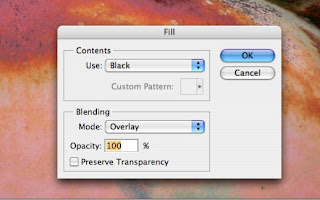
Open your image, black & white's work best, but any image you'd like to age will work. Do your normal adjustment layers first (Levels, Hue/Sat, Curves, etc.), then, above the image layer create a new blank layer, Layer>New, or the click on the little 'post-it note' looking icon in the Layers pallette. Fill this layer, Edit>Fill... with either Black or White, it doesn't really matter for us today.


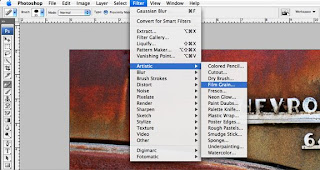
Select Filter>Artistic>Film Grain... And set the Grain Value to its maximum. At that setting
the other two sliders don't make a whole of difference, so fiddle if you like, but otherwise hit OK. Now, change that layers blend mode to 'Overlay", which will superimpose your new found grain on the image.


But wait, it's still not quite right for our taste, it needs a bit of softening.

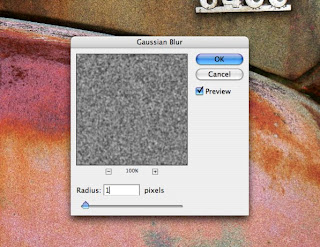
Go to Filter>Blur>Gaussian Blur and set this to 1-pixel and hit OK.


Now it's just a matter of lowering the opacity of that layer to taste (don't forget to rename that layer so you'll remember what it's purpose in life is), or duplicating that layer to add more grain. Again, season for taste.

That's it for today,
Thanks again for stopping by,
Tony

People Thoughts

Hello, just throwing in a few quotes/ideas I've run across, that I thought were fun and descriptive of life, including mine, while I'm working up my next blog post.

"There are two types of people in this world; Those that divide people into types and those who don't" unknown.

"There are some people that live in a dream world, and there are some who face reality - And then there are those who turn one into the other" Douglas Everett

"A photograph is not taken - it is made" Ansel Adams

And Now, For Something Completely Different - 101 Photoshop Tips In 5 Min By Deke